
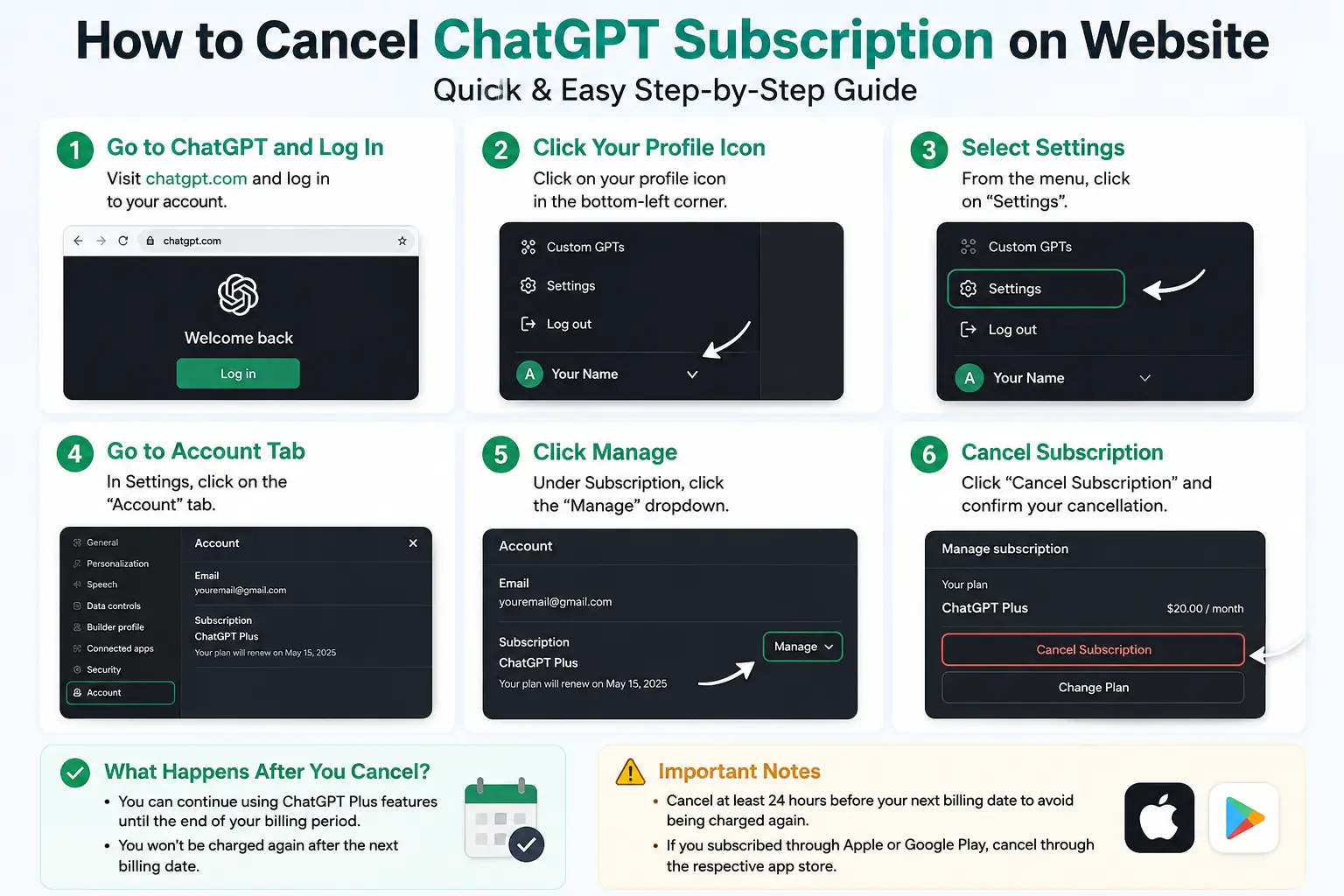
To cancel a ChatGPT subscription on the website, log in to chatgpt.com and click your profile icon. Select Settings, go to the Account tab, and click Manage. Finally, select Cancel Subscription and confirm your choice to stop future billing.
Navigating subscription settings can sometimes feel like a maze. Users who subscribed through chatgpt.com often want to stop future billing without deleting their entire OpenAI account, but finding the right menu requires a few specific steps.
This comprehensive guide will walk you through the exact website steps to end your premium access. We will cover what happens after you hit the cancel button and how mobile subscriptions differ from web-based ones.
You will also learn how to troubleshoot common problems, such as a missing cancel option, and get answers to other frequent questions about ChatGPT Plus, ChatGPT Pro, and ChatGPT Business capabilities.
Quick Answer: How Do I Cancel ChatGPT Subscription on Website?
To cancel a ChatGPT subscription on the website:
- Log in to ChatGPT on chatgpt.com
- Click your profile icon
- Select Settings
- Go to the Account tab
- Click Manage
- Select Cancel Subscription
- Confirm the cancellation
According to OpenAI’s official help documentation, this website method applies specifically when the subscription was originally created through chatgpt.com. It does not apply to subscriptions purchased through the Apple App Store or Google Play Store.
Before You Cancel: Check Where You Subscribed
Many users struggle to find the cancel button because they are looking in the wrong place. Your billing settings are tied directly to the platform where you originally upgraded your account.
- If you subscribed on chatgpt.com, cancel through the ChatGPT website.
- If you subscribed through an iPhone or iPad, cancel through Apple subscriptions.
- If you subscribed through Android, cancel through Google Play subscriptions.
- If you use ChatGPT Business, cancellation is handled from Workspace settings.
- If you have an Enterprise or Edu plan, this self-service guide may not apply.
OpenAI notes that App Store and Play Store subscriptions must be cancelled through the relevant mobile platform, not through the normal website billing flow.
| Subscription Source | Where to Cancel | Important Note |
|---|---|---|
| ChatGPT website | ChatGPT Settings > Account > Manage | Best match for standard web users |
| iPhone/iPad | Apple Settings > Subscriptions | Managed entirely by Apple |
| Android | Google Play > Subscriptions | Uninstalling the app does not cancel |
| ChatGPT Business | Workspace settings > Billing | Different from personal plans |
| Enterprise/Edu | Admin or organization support | Self-service guide may not apply |
Step-by-Step: How to Cancel ChatGPT Subscription on Website
If you confirmed that your purchase was made via the web, follow these exact steps to stop your subscription renewal.
Step 1: Log In to ChatGPT
Go to chatgpt.com. Use the exact email account that holds the active subscription. Make sure you are not accidentally logged in with a different email address.
Step 2: Open Your Profile Menu
Click your profile icon. This is usually located in the bottom corner of the sidebar or the main account area. Select Settings from the popup menu.
Step 3: Go to the Account Tab
Open the Account section within your settings. Look for the subscription or billing controls. Only active subscribers will see the full subscription management options here.
Step 4: Click Manage
Select the Manage dropdown or menu link. This action will securely open your subscription management options, typically hosted by Stripe.
Step 5: Select Cancel Subscription
Click Cancel Subscription. Follow the on-screen confirmation prompts to finalize the process. Save or screenshot the confirmation screen for your records.
What Happens After You Cancel ChatGPT Subscription?
After cancellation, you can usually keep using paid features until the end of your current billing period. OpenAI states that cancellation becomes effective the day after the next billing date.
- You do not immediately lose access to premium features in most cases.
- You can use paid features until your current paid period ends.
- You should cancel at least 24 hours before your renewal date to avoid another charge.
- Subscription fees are generally non-refundable.
- Deleting your account may affect cancellation differently depending on how you originally subscribed.
How to Cancel ChatGPT Subscription on iPhone
If you upgraded using the iOS app, you must handle the process through Apple’s ecosystem.
- Open your iPhone Settings app
- Tap your name at the top of the screen
- Tap Subscriptions
- Select ChatGPT from the list
- Tap Cancel Subscription
- Confirm the cancellation
OpenAI’s iOS cancellation help states that Apple App Store subscriptions are managed entirely by Apple. You must use the iOS subscription settings to stop the billing.
How to Cancel ChatGPT Subscription on Android
Users who purchased premium access via the Android app must use Google’s billing system.
- Open the Google Play Store
- Make sure you are signed in with the correct Google account
- Tap the Menu or your profile icon
- Go to Subscriptions
- Select ChatGPT
- Tap Cancel subscription
- Follow the on-screen instructions
OpenAI’s Android help article explicitly warns that simply uninstalling the ChatGPT Android app does not cancel the subscription.
Why Can’t I See the Cancel Subscription Option?
If the cancel button is nowhere to be found, it usually means your billing is managed elsewhere.
Possible reasons include:
- You subscribed through iPhone or Android, not the website.
- You are logged in with the wrong email address.
- You are using a workspace, Business, Enterprise, or Edu plan.
- Your subscription is already cancelled.
- Billing is handled by Apple, Google, or another organization.
- You do not currently have an active paid plan on that specific account.
To fix this issue quickly, check your payment receipt to confirm the correct email address. Review your Apple or Google subscriptions on your mobile device. If you still cannot access the account, contact OpenAI support.
Does Deleting ChatGPT Account Cancel the Subscription?
OpenAI’s current cancellation article states that deleting a ChatGPT account automatically cancels a web-based subscription and stops future billing for that account. However, the iOS-specific article warns that deleting your ChatGPT account on the web interface does not cancel an Apple-managed ChatGPT subscription.
Because Apple manages that subscription separately, deleting the OpenAI account will leave the Apple billing active. Users must cancel from the exact same platform where they originally subscribed.
- Website subscription: cancel on chatgpt.com.
- Apple subscription: cancel through iPhone/iPad settings.
- Android subscription: cancel through Google Play.
- Do not rely only on deleting the app or account.
- Always keep your cancellation confirmation.
Can You Remove ChatGPT Watermark?
The phrase “remove ChatGPT watermark” usually refers to AI image labels, visible marks, or embedded provenance metadata. OpenAI says images generated with ChatGPT and its API include C2PA metadata, which helps verify origin and provenance.
OpenAI notes that this metadata can be removed accidentally or intentionally—for example, by taking screenshots—but a missing metadata signal does not prove the image was not generated by OpenAI tools.
- ChatGPT images may include provenance metadata.
- C2PA is not the same as a normal visible logo watermark.
- Metadata can sometimes be stripped by social platforms or screenshots.
- For ethical use, always disclose AI-generated images where required.
- Do not misrepresent AI-generated content as real photography.
Can ChatGPT Analyze Videos?
ChatGPT can analyze uploaded images, screenshots, documents, spreadsheets, charts, and other supported files. Native video analysis support depends heavily on current product capabilities, your specific plan, and file support at the time of use. OpenAI’s Help Center describes file uploads for documents and images, but current image inputs generally do not support raw video files.
If you need video insights, you can:
- Upload screenshots extracted from the video.
- Upload a text transcript of the audio.
- Upload subtitles if they are available.
- Ask ChatGPT to summarize scenes from the extracted frames.
- Verify current ChatGPT file upload support before planning a workflow around video.
Can ChatGPT Solve USACO Problems?
ChatGPT can help with USACO-style competitive programming by explaining algorithms, debugging code, creating test cases, and discussing time complexity. OpenAI describes ChatGPT and Codex as useful for planning, designing, prototyping, debugging, and coding workflows.
- ChatGPT can explain complex problem statements clearly.
- It can suggest necessary algorithms like BFS, DFS, dynamic programming, greedy algorithms, and binary search.
- It can write sample C++, Python, or Java solutions.
- It can debug wrong answers or time limit exceeded (TLE) issues.
- It may still make logic mistakes, so users should always test submissions thoroughly.
- For actual contests, users must follow USACO rules and avoid cheating.
Common ChatGPT Subscription Problems and Fixes
Even with a clear guide, billing issues happen. Here are common problems and how to resolve them:
- Problem: Cancel button missing
Fix: Check if you subscribed through Apple or Google, or if you are logged into the wrong account. - Problem: Charged after cancellation
Fix: Check your cancellation date. You must cancel at least 24 hours before renewal to prevent the next charge. - Problem: Wrong account opened
Fix: Log in with the exact email address that received the original payment receipt. - Problem: App deleted but subscription still active
Fix: Cancel directly through Apple or Google subscription settings on your device. - Problem: Cannot access old email
Fix: Contact OpenAI support with your specific account and payment details.
Final Checklist Before Cancelling
Before you walk away, run through this quick checklist to ensure you won’t see unexpected charges on your next bank statement.
- Confirm your subscription platform (Web, iOS, Android).
- Use the exact email account used for billing.
- Cancel at least 24 hours before your renewal date.
- Save the confirmation email or take a screenshot.
- Do not just uninstall the mobile app.
- Check Apple/Google subscriptions if you subscribed on a mobile device.
- Contact support if the account becomes inaccessible.
Taking Control of Your OpenAI Billing
Managing your ChatGPT subscription does not have to be frustrating. By identifying exactly where you originally subscribed and following the correct platform-specific steps, you can stop future billing in just a few minutes. Whether you are taking a break from AI tools or switching to a different plan, keeping track of your subscription settings ensures you remain in complete control of your account.
Frequently Asked Questions About Cancelling ChatGPT
How do I cancel ChatGPT subscription on website?
Log in to chatgpt.com, click your profile icon, and open Settings. Navigate to the Account tab, click Manage, and select Cancel Subscription to stop future billing.
Why don’t I see the cancel subscription button in ChatGPT?
You might be logged in with the wrong email, or you may have subscribed through the Apple App Store or Google Play Store, which require cancellation on your mobile device.
Can I cancel ChatGPT from the mobile app?
If you subscribed via Apple or Google, you must cancel using the subscription settings built into your iPhone or Android device, not just by deleting the app.
Will I get a refund after cancelling ChatGPT?
Subscription fees are generally non-refundable. You will retain access to premium features until the end of your current billing cycle.
Can ChatGPT analyze videos?
ChatGPT cannot natively analyze raw video files, but it can analyze uploaded screenshots, transcripts, and subtitles extracted from a video.
Can ChatGPT solve USACO?
ChatGPT can assist with competitive programming by explaining algorithms and debugging code, though users must test the output for accuracy and follow all contest rules.
Can I remove ChatGPT watermark from images?
ChatGPT images contain embedded C2PA metadata rather than visible watermarks. While screenshots might strip this metadata, users should always ethically disclose AI-generated content.