



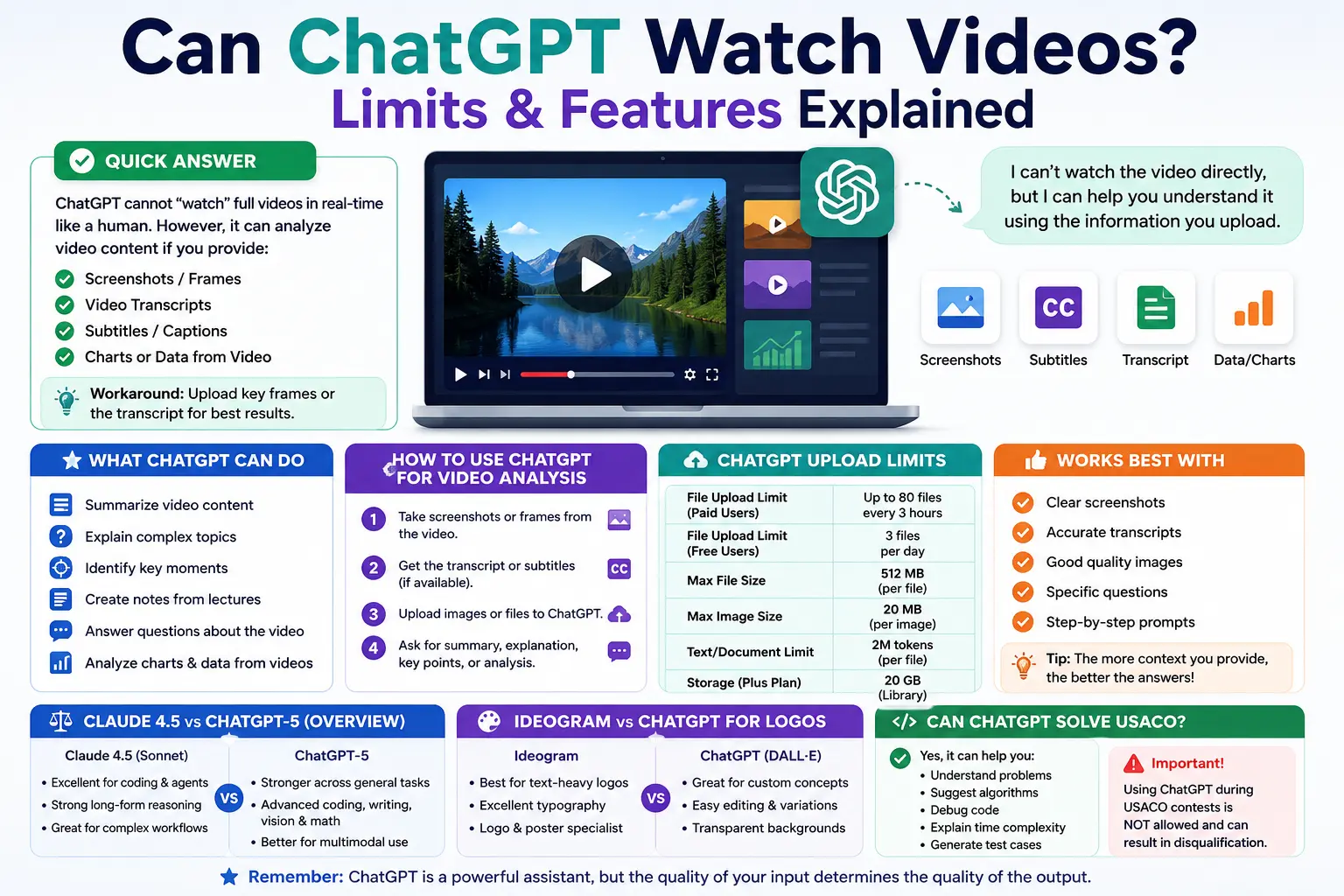
ChatGPT cannot natively watch or process raw video files. However, ChatGPT can analyze video content if you provide supported inputs like screenshots, frames, YouTube transcripts, captions, or text summaries.
People frequently ask if ChatGPT can watch videos when they want to summarize a clip, analyze a tutorial, or understand what happens inside a recorded screen. While OpenAI has expanded the capabilities of its AI writing platform significantly, native video analysis remains limited. Users often try to upload MP4 files only to face error messages.
Understanding how ChatGPT handles multimodal inputs saves significant time and frustration. The platform excels at processing images, screenshots, charts, documents, and other supported files. By learning the right workarounds, users can extract the same value from a video without needing the AI to watch the raw footage.
This guide explains exactly what ChatGPT can analyze, how to navigate file upload limits, and how the platform stacks up against competitors like Claude 4.5 and Ideogram. You will learn the best methods for extracting insights from video content using AI.
Can ChatGPT Watch Videos Directly?
ChatGPT can help analyze video content if you provide supported inputs such as screenshots, frames, transcripts, captions, or summaries. However, OpenAI’s current capability overview mainly describes image, document, data, and file analysis. The Help Center search result for video inputs explicitly says image inputs do not handle videos directly.
- ChatGPT can analyze screenshots from a video.
- ChatGPT can summarize video transcripts.
- ChatGPT can review subtitles or captions.
- ChatGPT can explain frames, charts, slides, or screen recordings through images.
- ChatGPT may not always process a raw video file directly.
- The best workaround is to upload key screenshots alongside a text transcript.
What Can ChatGPT Analyze Instead of Videos?
If ChatGPT cannot directly watch a full video, users can still get useful analysis by uploading visual frames, text transcripts, subtitles, or related documents. OpenAI states that ChatGPT can analyze uploaded images, screenshots, diagrams, charts, PDFs, presentations, text documents, and CSV data files depending on plan and feature availability.
- Video screenshots
- Scene-by-scene frames
- YouTube transcript
- Subtitle file
- Lecture notes
- Presentation slides
- Screen recording screenshots
- PDF or document related to the video
- CSV/data file if the video contains statistics
How to Use ChatGPT for Video Analysis Without Uploading Video
Take 5–10 important screenshots from the video.
Upload screenshots in order.
Add a short explanation of what the video is about.
Paste the video transcript if available.
Ask ChatGPT to summarize, explain, compare, or detect key points.
For educational lectures, ask for notes and quiz questions.
For tutorials, ask for step-by-step instructions and missing details.
For screen recordings, upload clear frames of the software interface.
Suggested prompt:
“I cannot upload the full video, so I am uploading key screenshots and the transcript. Analyze the sequence, summarize the main points, identify important moments, and explain anything unclear.”
What is the ChatGPT File Upload Limit Per Day?
OpenAI’s File Uploads FAQ says paid users can upload up to 80 files every 3 hours, while Free users are limited to 3 file uploads per day. OpenAI also notes these limits may be reduced during peak hours to manage server load.
- Paid users: up to 80 files every 3 hours.
- Free users: 3 file uploads per day.
- Limits may change during peak hours.
- Failed uploads may sometimes count toward limits.
- Users cannot currently check the exact remaining upload quota.
- Upload limits are separate from storage limits.
| Plan / Use Case | Upload Limit |
|---|---|
| Free users | 3 uploads per day |
| Paid users | Up to 80 files every 3 hours |
| Per image | 20 MB maximum |
| Per file | 512 MB maximum |
| Text/document file | 2M tokens maximum |
| Spreadsheet/CSV | Around 50 MB depending on row size |
How Many Pictures Can You Upload to ChatGPT Plus?
OpenAI does not publish a separate “pictures per day” number for ChatGPT Plus. Images follow the standard file upload system: each image upload can be up to 20 MB, and paid users can upload up to 80 files every 3 hours, subject to rate limits, storage limits, and peak-hour reductions.
- Images count as uploaded files.
- Each image can be up to 20 MB.
- ChatGPT Plus users follow paid-user upload limits.
- If uploads fail, compress the image.
- Use JPG/WebP for a smaller size.
- Upload only key frames if analyzing video content.
- For better results, use clear screenshots with readable text.
What are the ChatGPT Plus File and Storage Limits?
OpenAI’s Library article says uploaded and created files are saved to the Library, and Library storage is separate from daily attachment and chat limits. The same article lists storage limits by plan, including 20 GB for Plus and Business users and 100 GB for Pro users.
- The Library saves uploaded and created files.
- Library storage is separate from daily upload and chat limits.
- ChatGPT Plus storage is 20 GB.
- Pro storage is 100 GB.
- Temporary Chat uploads are not saved to the Library.
- Delete old files if you hit storage limits.
How Do Claude 4.5 and ChatGPT-5 Compare?
Claude 4.5 and ChatGPT-5 are both strong AI systems, but they are usually compared for different strengths. Anthropic describes Claude Sonnet 4.5 as its best model for complex agents and coding, while OpenAI describes GPT-5 as a major leap across coding, math, writing, health, visual perception, and general reasoning.
| Feature | Claude 4.5 | ChatGPT-5 |
|---|---|---|
| Best known for | Coding, agents, long tasks | General reasoning, coding, writing, visual tasks |
| Coding help | Very strong | Very strong |
| Image/file workflow | Depends on Claude features | Strong ChatGPT file/image ecosystem |
| General user experience | Strong for long-form reasoning | Strong for mixed everyday tasks |
| Best for | Developers, agentic workflows | General users, research, coding, multimodal work |
Is Ideogram or ChatGPT Better for Logos?
Ideogram is especially strong for typography-heavy designs and logo-style visuals because its official documentation emphasizes text rendering, logos, posters, and clear typography. ChatGPT is strong for natural-language image generation, editing, adding details, and creating transparent backgrounds.
| Need | Better Choice |
|---|---|
| Logo with readable text | Ideogram |
| Brand concept brainstorming | ChatGPT |
| Editing existing images | ChatGPT |
| Typography posters | Ideogram |
| Transparent background image | ChatGPT |
| Multiple logo ideas quickly | Both |
- Use Ideogram when exact text accuracy is the main priority.
- Use ChatGPT when you need concept creation, prompt engineering, brand strategy, and image editing.
- For final business logos, always vectorize the design manually.
- Check copyright and trademark issues before using any AI logo generator commercially.
- Do not rely on AI alone for final brand identity.
Can ChatGPT Solve USACO Problems?
ChatGPT can help explain competitive programming problems, suggest algorithms, debug code, and teach data structures, but using ChatGPT during official USACO contests is prohibited. USACO’s official contest rules clearly state that the use of generative AI services like ChatGPT is not allowed during active contests.
- ChatGPT can help with practice problems.
- ChatGPT can explain BFS, DFS, DP, greedy algorithms, binary search, graphs, and sorting.
- ChatGPT can review your code after practice sessions.
- ChatGPT can generate test cases.
- ChatGPT can explain why a solution gets a Time Limit Exceeded (TLE) or wrong answer.
- Do not use ChatGPT during active official USACO contests.
- Use ChatGPT as a tutor, not as a cheating tool.
Suggested safe prompt:
“I am practicing for USACO. Do not give me the full solution first. Explain the problem-solving approach, hints, edge cases, and time complexity step by step.”
What is the Best Way to Ask ChatGPT About Videos, Files, and Coding?
- Be specific about the goal.
- Upload clean screenshots or files.
- Tell ChatGPT exactly what output you want.
- Ask for step-by-step reasoning for coding practice.
- Ask for summaries, tables, and action points.
- Mention if the content is a lecture, tutorial, meeting, or screen recording.
- For USACO practice, ask for hints before full code.
- Provide context alongside every file upload.
Common Problems and Fixes
| Problem | Reason | Fix |
|---|---|---|
| Video will not upload | Raw video may not be supported | Upload screenshots and a text transcript |
| Image upload fails | File too large | Compress the file below 20 MB |
| Upload limit reached | Rate limit or storage cap | Wait 3 hours or delete old files |
| ChatGPT misses details | Screenshot unclear | Upload a sharper image |
| USACO answer wrong | Algorithm or edge case issue | Ask for test cases and complexity check |
| Logo text is wrong | AI text rendering issue | Try Ideogram or refine prompt |
Next Steps for Mastering AI Workflows
Mastering tools like ChatGPT requires understanding their limitations just as much as their capabilities. While you cannot upload a raw video file directly, using transcripts and screenshots provides a highly effective workaround for AI video analysis. Choose the right AI assistant based on your needs: use Ideogram for typography, Claude 4.5 for complex coding agents, and ChatGPT for general reasoning and multimodal tasks.
Common Questions About ChatGPT Video and Upload Limits
Can ChatGPT watch videos directly?
No, ChatGPT cannot natively watch or process raw video files. The best workaround is to upload key screenshots along with the video transcript.
Can ChatGPT analyze YouTube videos?
ChatGPT cannot directly watch a YouTube video URL. However, ChatGPT can analyze YouTube transcripts or screenshots if you manually provide them in the prompt.
What is the ChatGPT file upload limit per day?
Free users are limited to 3 file uploads per day. Paid ChatGPT Plus users can upload up to 80 files every 3 hours, though this may decrease during peak times.
How many pictures can you upload to ChatGPT Plus?
OpenAI does not have a separate image limit. Images count as standard files, meaning paid users can upload up to 80 images every 3 hours (max 20 MB each).
Is Claude 4.5 better than ChatGPT-5?
This depends heavily on the use case. Claude Sonnet 4.5 is incredibly strong for coding and complex agents, while ChatGPT-5 excels across general reasoning, writing, and multimodal visual workflows.
Is Ideogram better than ChatGPT for logos?
Ideogram is generally better for logos because it excels at rendering readable text and typography. ChatGPT is better for broad concept creation, editing, and generating transparent backgrounds.
Can ChatGPT solve USACO?
ChatGPT can solve and explain competitive programming problems during practice. However, using generative AI tools during official USACO contests is strictly prohibited by the rules.