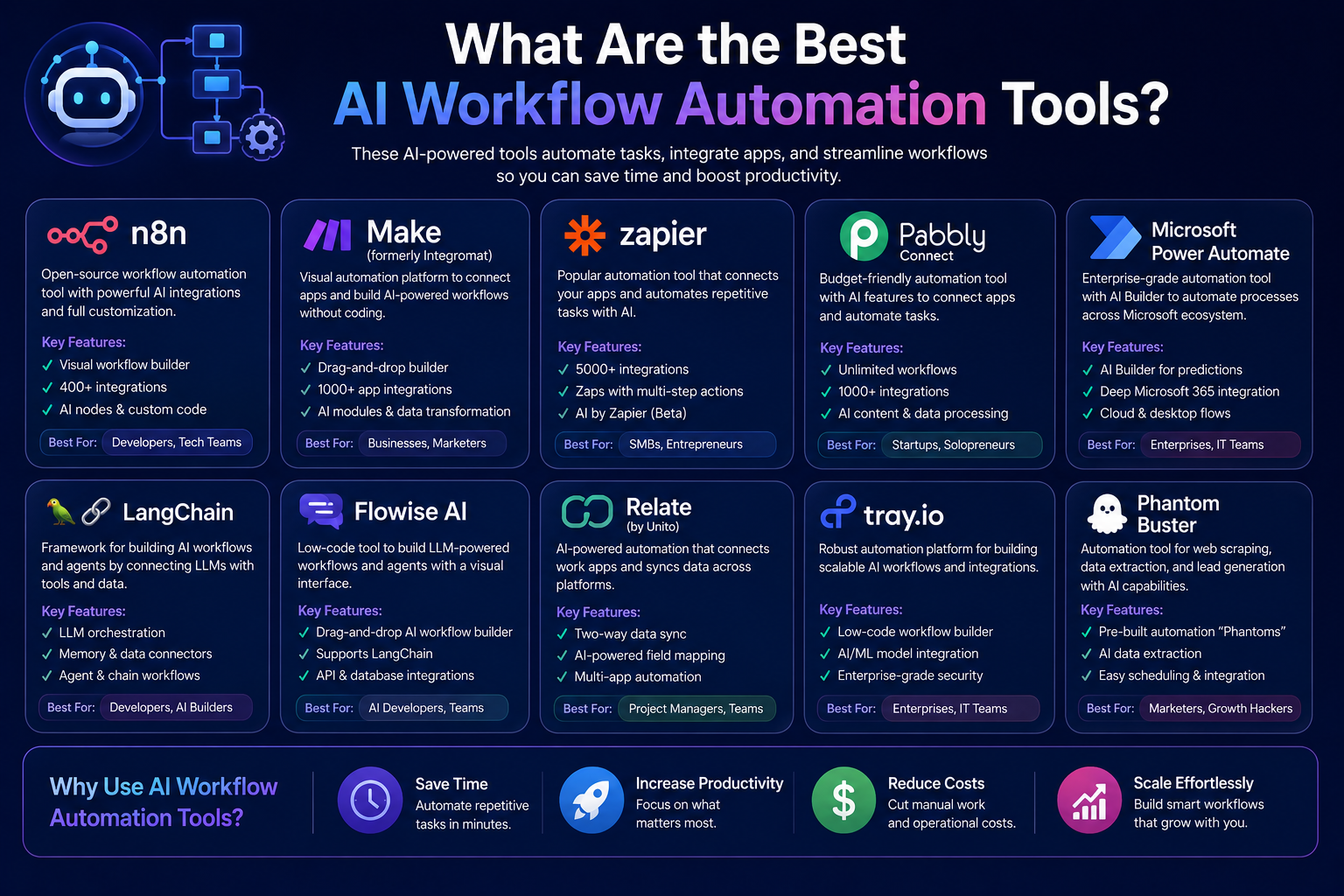
What Are the Best AI Workflow Automation Tools?
introduction
AI workflow automation tools are becoming very popular because they help people save time and reduce manual work. Businesses, freelancers, marketers, sales teams, and content creators use these tools to complete daily tasks faster.
But many people ask: what are the best AI workflow automation tools?
The simple answer is that tools like Zapier, Make, n8n, Microsoft Power Automate, Bardeen, Relay.app, Lindy, and Gumloop are some of the best options for AI workflow automation.
These tools can connect different apps, move data automatically, create AI agents, send emails, update spreadsheets, manage leads, summarize content, and handle repetitive tasks.
In this guide, you will learn what AI workflow automation tools are, how they work, and which tools are best for different types of users.
What Are AI Workflow Automation Tools?
AI workflow automation tools are software platforms that help automate tasks using artificial intelligence.
A normal automation tool follows fixed rules. For example, when someone fills out a form, the tool can add that person’s details to Google Sheets.
But an AI workflow automation tool can do more. It can read, understand, summarize, write, classify, and make simple decisions.
For example, an AI automation tool can:
- Read a customer message
- Understand what the customer wants
- Write a reply
- Add details to a CRM
- Notify your team
- Create a follow-up task
This makes AI workflow tools useful for modern businesses.
Why Are AI Workflow Automation Tools Useful?
AI workflow automation tools are useful because they save time.
Many people waste hours every week on small repeated tasks. These tasks may look simple, but they take a lot of energy when done every day.
AI automation can help with:
- Email replies
- Lead management
- Customer support
- Data entry
- Content creation
- Social media tasks
- Reports
- Meeting notes
- Sales follow-ups
When these tasks are automated, teams can focus on more important work.
1. Zapier
Zapier is one of the most popular workflow automation tools. It connects thousands of apps and helps users build automations without coding.
Zapier now focuses strongly on AI workflows, AI agents, chatbots, tables, forms, and app integrations. Zapier says it supports AI workflows and agents across more than 9,000 apps.
Zapier is useful for:
- Small businesses
- Marketers
- Freelancers
- Sales teams
- Content teams
- Beginners
You can use Zapier to connect tools like Gmail, Google Sheets, Slack, Notion, HubSpot, Trello, and many others.
For example, when someone fills out a contact form, Zapier can send the data to your spreadsheet, notify your team, and ask AI to write a follow-up email.
2. Make
Make is another powerful AI workflow automation tool. It is popular because it allows users to build workflows visually.
Make is useful for people who want more control over their automations. You can see how each step connects with the next step.
Make says its platform helps users visually build, scale, and automate AI and agentic workflows. It also highlights no-code automation and enterprise security features.
Make is useful for:
- Agencies
- Business teams
- Operations teams
- E-commerce stores
- Advanced automation users
Make also offers AI agents that can help automate complex work while keeping visibility into decisions, app connections, and costs.
3. n8n
n8n is a strong workflow automation tool for technical users and advanced teams.
It gives users more flexibility than many simple no-code tools. It can be used with no-code features, but it also supports custom logic for people who understand technical workflows.
n8n describes itself as a platform for building production-ready AI agents with practical workflows, templates, and 1,000+ integrations.
n8n is useful for:
- Developers
- Technical teams
- Startups
- Automation experts
- Businesses that need custom workflows
If you want more control over your AI workflow automation, n8n can be a good choice.
4. Microsoft Power Automate
Microsoft Power Automate is a good option for businesses already using Microsoft tools.
It works well with Microsoft 365, Outlook, Teams, SharePoint, Excel, and other Microsoft services.
Power Automate is useful for office workflows, approval systems, document tasks, internal notifications, and business process automation.
Microsoft’s 2026 Power Automate release plan mentions newer integration capabilities, including MCP server support, Copilot Studio agents, and Power Platform connectors.
Power Automate is useful for:
- Corporate teams
- Microsoft 365 users
- HR teams
- Finance teams
- Operations teams
- Enterprise businesses
If your company already uses Microsoft tools, Power Automate can be a smart option.
5. Bardeen
Bardeen is an AI automation tool that works well for browser-based tasks.
It can help users automate research, web scraping, writing, summarizing, replying, translating, and other online tasks. Its Chrome Web Store listing says users can create automations with simple language using a ChatGPT-style AI chatbot.
Bardeen is useful for:
- Sales teams
- Recruiters
- Researchers
- Marketers
- Lead generation teams
- People who work mostly in the browser
For example, you can use Bardeen to collect data from websites, organize leads, summarize pages, or create outreach workflows.
6. Relay.app
Relay.app is another useful AI workflow automation platform.
It is good for teams that want automation but also want control over what each workflow can access and do.
Relay.app says it automates work in 200+ popular apps and gives users access to top AI models with fine-grained control.
Relay.app is useful for:
- Small teams
- Startups
- Marketing teams
- Operations teams
- Users who want simple AI workflows
It can help automate repeated tasks while keeping the workflow easy to understand.
7. Lindy
Lindy is more like an AI assistant for daily work.
It helps users manage inboxes, meetings, calendars, and other routine tasks. Lindy describes itself as an AI executive assistant that can proactively manage inbox, meetings, and calendar work.
Lindy is useful for:
- Founders
- Executives
- Busy professionals
- Salespeople
- Managers
- People with many meetings and emails
If your main problem is managing daily communication and schedule tasks, Lindy can be a helpful AI automation tool.
8. Gumloop
Gumloop is an AI automation platform built for creating AI-powered workflows.
It is useful for people who want to build workflows that use AI models, internal data, external data, and recurring tasks.
Gumloop says it supports different AI models without vendor lock-in and can connect to internal and external data for recurring agent tasks.
Gumloop is useful for:
- Marketing teams
- Sales teams
- Operations teams
- AI builders
- Agencies
- Workflow automation experts
It can be used for tasks like lead research, call analysis, reporting, content workflows, and data processing.
Which AI Workflow Automation Tool Is Best?
The best AI workflow automation tool depends on your needs.
If you are a beginner, Zapier is a good starting point.
If you want visual workflow building, Make is a strong option.
If you are technical and need more control, n8n is useful.
If your business uses Microsoft tools, Power Automate may be the best choice.
If you want browser automation, Bardeen is helpful.
If you want a daily AI assistant, Lindy can be useful.
If you want AI-native workflows, Gumloop is worth considering.
Best Tool for Beginners
For beginners, Zapier is one of the easiest tools to start with.
It has a simple interface and connects with many popular apps. Users can create automations without needing technical knowledge.
For example, a beginner can create a workflow like this:
- New form submission received
- Add details to Google Sheets
- Send a welcome email
- Notify team in Slack
- Ask AI to create a short summary
This type of workflow can save a lot of time.
Best Tool for Advanced Users
For advanced users, Make and n8n are better options.
Make is good for visual automation with more control. n8n is good for users who want flexibility and technical customization.
These tools are useful when simple automation is not enough and you need more detailed workflow logic.
Best Tool for Business Teams
For business teams, Microsoft Power Automate, Zapier, and Make are strong options.
Power Automate is best for Microsoft-based companies. Zapier is good for general app automation. Make is good for teams that want visual workflow control.
The right choice depends on the tools your business already uses.
Final Thoughts
So, what are the best AI workflow automation tools?
The best tools include Zapier, Make, n8n, Microsoft Power Automate, Bardeen, Relay.app, Lindy, and Gumloop.
Each tool has a different purpose. Some are better for beginners, some are better for technical users, and some are better for business teams.
AI workflow automation tools can save time, reduce manual work, improve productivity, and help teams focus on important tasks.
Before choosing a tool, think about your needs, your budget, your apps, and the type of work you want to automate.
FAQs
What are the best AI workflow automation tools?
Some of the best AI workflow automation tools are Zapier, Make, n8n, Microsoft Power Automate, Bardeen, Relay.app, Lindy, and Gumloop.
What is an AI workflow automation tool?
An AI workflow automation tool is software that uses artificial intelligence to automate tasks like emails, data entry, reports, summaries, and app connections.
Which AI automation tool is best for beginners?
Zapier is a good option for beginners because it is easy to use and connects with many apps.
Which AI workflow tool is best for technical users?
n8n is a good choice for technical users because it offers more flexibility and control.
Can AI workflow tools save time?
Yes, AI workflow tools can save time by automating repeated tasks such as emails, lead updates, reports, and notifications.