How to Do AI Caricature Trend
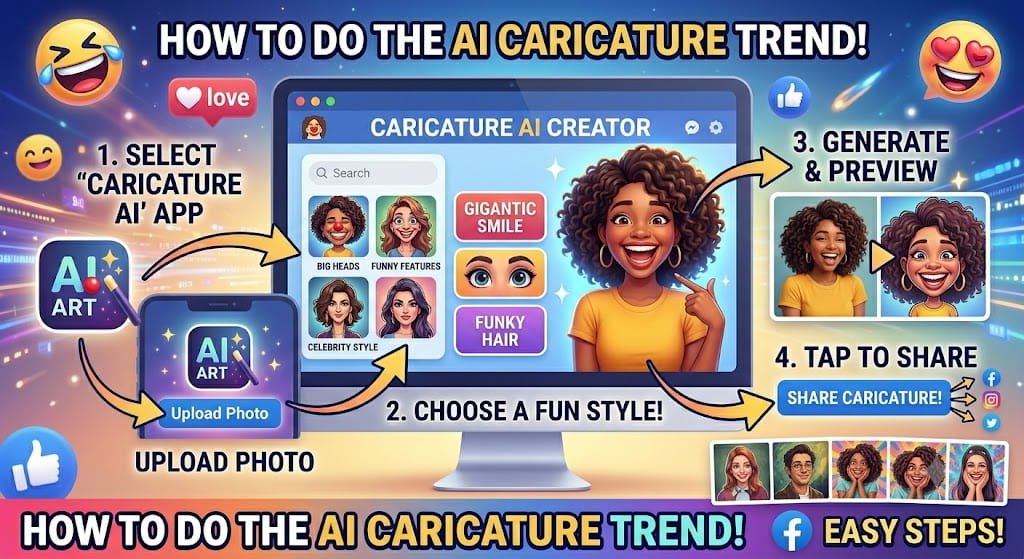
The AI caricature trend has become one of the most popular social media trends of 2026. People are turning ordinary selfies into hilarious, artistic, and highly detailed cartoon portraits with the help of artificial intelligence.
From Facebook and Instagram to TikTok and X, AI-generated caricatures are everywhere. Some are funny and exaggerated, while others look like professional illustrations created by digital artists.
If you’re wondering how to do AI caricature trend, this guide will walk you through everything you need to know.
What Is the AI Caricature Trend?
An AI caricature is a digitally generated portrait that exaggerates certain facial features while maintaining the person’s overall appearance.
Traditional caricatures are usually hand-drawn by artists. Today, AI can create similar artwork within seconds.
Common caricature styles include:
- Funny cartoon portraits
- Celebrity-style caricatures
- Comic book illustrations
- Pixar-inspired characters
- Professional cartoon avatars
- Fantasy-themed caricatures
The trend became popular because it allows anyone to create unique artwork without drawing skills.
Why Is the AI Caricature Trend Going Viral?
Several reasons explain why this trend has exploded online.
Easy to Create
Users only need a photo and an AI tool.
Highly Shareable
People love posting creative versions of themselves on social media.
Personalized Content
Every caricature is unique to the individual.
No Artistic Skills Needed
AI handles the design process automatically.
Fast Results
Most images are generated in less than a minute.
Best AI Tools for Creating Caricatures
ChatGPT Image Generation
One of the most popular tools for creating detailed AI caricatures.
Canva AI
Canva offers beginner-friendly image generation features.
Fotor AI
Known for portrait enhancements and cartoon effects.
Picsart AI
Provides creative AI image generation for social media users.
Adobe Firefly
Offers professional-quality AI-generated artwork and artistic styles.
How to Do AI Caricature Trend Step by Step
Step 1: Choose the Right Photo
Start with a high-quality image.
For best results:
- Use natural lighting
- Keep your face clearly visible
- Avoid blurry photos
- Use a front-facing portrait
The quality of the original photo greatly affects the final result.
Step 2: Open an AI Image Generator
Choose one of the AI tools mentioned above.
Upload your selected photo.
Most platforms support:
- JPG
- PNG
- HEIC
formats.
Step 3: Write a Detailed Prompt
The prompt tells the AI what type of caricature to create.
Example:
Create a highly detailed caricature of this person with exaggerated facial expressions, large eyes, colorful cartoon style, vibrant lighting, professional digital illustration, social media trending artwork.
Detailed prompts often generate significantly better results.
Step 4: Generate the Image
Click the generate button and allow the AI to process your request.
Most tools produce results within seconds.
Step 5: Refine and Regenerate
If the first image isn’t perfect:
- Add more prompt details
- Change the art style
- Adjust facial exaggeration
- Generate additional versions
Many users create multiple images before choosing their favorite.
Best AI Caricature Prompts
Funny Caricature Prompt
Turn this person into a humorous caricature with oversized eyes, exaggerated smile, colorful cartoon style, playful expression, and vibrant illustration.
Professional Caricature Prompt
Create a polished professional caricature with realistic details, elegant cartoon styling, clean background, and high-quality digital artwork.
Comic Book Prompt
Transform this photo into a dramatic comic-book caricature with bold lines, vibrant colors, dynamic lighting, and heroic expression.
Pixar-Inspired Prompt
Create a charming animated caricature inspired by modern animated movies with expressive eyes, smooth textures, and cinematic lighting.
Fantasy Character Prompt
Turn this person into a fantasy warrior caricature with detailed armor, magical effects, epic lighting, and vibrant colors.
How to Make Your Caricature Look Better
Use High-Resolution Photos
Clear photos produce sharper AI artwork.
Describe Facial Expressions
Expressions add personality to the caricature.
Include Artistic Style Instructions
Mention styles like:
- Cartoon
- Comic
- Digital painting
- Animated movie
- Fantasy illustration
Experiment With Backgrounds
Interesting backgrounds often improve engagement on social media.
Where Can You Use AI Caricatures?
AI caricatures are useful for many purposes.
Social Media Profiles
Many users update their profile pictures with caricatures.
Business Branding
Entrepreneurs often use caricatures for personal branding.
Content Creation
Creators use caricatures in videos, blogs, and presentations.
Gifts and Prints
Some people print AI caricatures as personalized gifts.
Gaming Profiles
Caricatures can be used as gaming avatars and profile images.
Common Mistakes to Avoid
Using Poor-Quality Images
Low-quality photos often create distorted results.
Writing Weak Prompts
Generic prompts usually produce average images.
Expecting Perfection Immediately
Generating multiple versions is often necessary.
Ignoring Final Edits
Minor adjustments can significantly improve the finished image.
Is the AI Caricature Trend Free?
Yes, many AI platforms offer free generations.
However, paid plans may provide:
- Better image quality
- Faster generation
- More styles
- Advanced customization
For casual users, free tools are usually enough.
The Future of AI Caricatures
AI image technology continues to improve rapidly.
Future caricature trends may include:
- Animated caricatures
- Interactive avatars
- Personalized AI characters
- Video-based caricatures
- Real-time caricature generation
As AI becomes more powerful, the quality and creativity of caricatures will continue to improve.
Final Thoughts
Learning how to do AI caricature trend is easier than ever. With a clear photo, a powerful AI tool, and a creative prompt, you can generate eye-catching caricatures in minutes.
Whether you’re creating content for social media, building a personal brand, or simply having fun with AI technology, the caricature trend offers endless creative possibilities.
FAQs
What is the AI caricature trend?
It is a social media trend where AI transforms photos into exaggerated cartoon-style portraits.
Which AI tool is best for caricatures?
Popular options include ChatGPT Image Generation, Canva AI, Fotor AI, Picsart AI, and Adobe Firefly.
Can I create AI caricatures for free?
Yes. Many AI tools offer free daily image generations.
Why do caricatures exaggerate facial features?
Exaggeration is a key characteristic of caricature art and helps create a fun, recognizable image.
Are AI caricatures suitable for professional use?
Yes. Many professionals use AI caricatures for branding, social media profiles, and marketing content.