How to Do the AI Caricature Trend
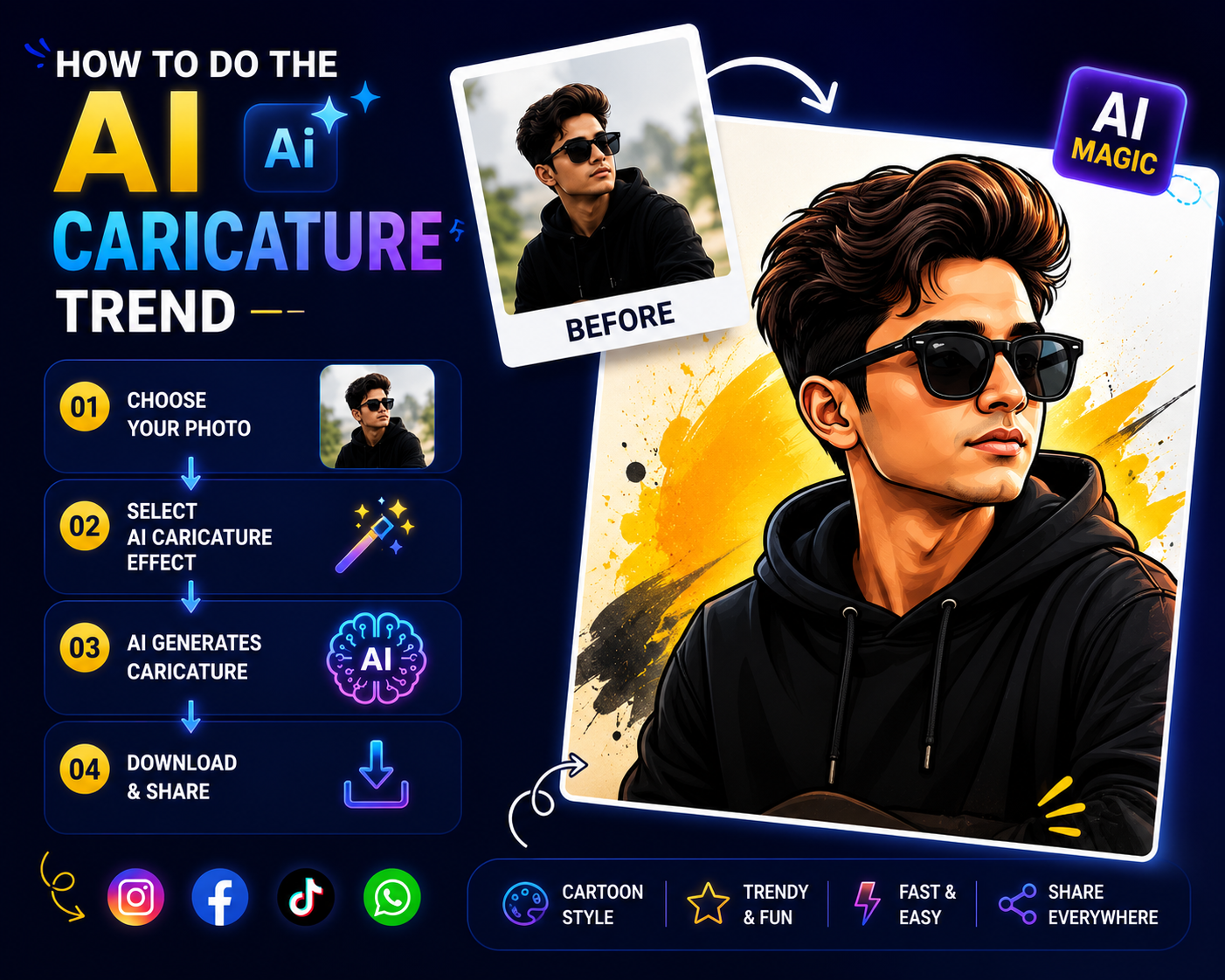
The AI caricature trend is a viral format where users upload a selfie to ChatGPT and ask it to generate an exaggerated cartoon of themselves at work, using the prompt “Create a caricature of me and my job based on everything you know about me. Unlike older cartoon-filter apps that only restyled a photo, this trend pulls in contextual details from your prior conversations with the AI your profession, hobbies, and personality traits to build a caricature that feels personalized rather than generic, which is exactly why it exploded across Instagram, TikTok, and LinkedIn in early 2026.
What Is the AI Caricature Trend?
The AI caricature trend works by combining two things ChatGPT already has access to: your uploaded photo and, if you’re a regular user, a context bank built from your past conversations. The AI links pieces of your self-described job, interests, and personality into a single exaggerated cartoon scene a nurse surrounded by medical equipment, a coffee-obsessed writer with a laptop and mug, a pilot in uniform with a runway backdrop. If you don’t have much chat history, you can still get a convincing result by simply describing yourself directly in the prompt instead.
How to Do the AI Caricature Trend (Step by Step)
- Log in to ChatGPT : on the web or mobile app the free tier supports this trend.
- Upload a clear photo of yourself : using the attach button a close-up with good lighting and a plain background works best.
- Enter the prompt : Create a caricature of me and my job based on everything you know about me.”
- Add your own context if needed : if you’re new to ChatGPT or want more control, write your job and a few personal details directly into the prompt instead of relying on chat history, for example: “Create a caricature of me and my job. I am a nurse in a hospital and mainly work with children.
- Refine with follow-up prompts : Make it more cartoonish reduce the exaggeration slightly or add more items related to my hobby” all work well to adjust the first result.
- Download and share : once you’re happy with the output Instagram, TikTok, and LinkedIn are the most common places this trend gets posted.
Best Tools for the AI Caricature Trend: A Comparison
- ChatGPT : the tool most associated with this specific trend, since the personalization comes from its memory of your past conversations. Note that ChatGPT itself generates the caricature through its built-in image capability rather than needing a separate app.
- Google Gemini : the same style of prompt works here too, though most of the viral examples shared online are specifically from ChatGPT.
- Nano Banana 2 : offers a free tier for caricature generation and is commonly used for fast, low-cost draft generations before refining elsewhere.
- Midjourney : better suited if you want a more artistically polished final result rather than a quick, casual output.
- MyEdit / Cartoonify : dedicated caricature apps that existed before this trend and can take a ChatGPT-written prompt description and turn it into a more customizable, higher-quality image than a chat interface alone typically produces.
If you’re a casual, one-time participant, ChatGPT alone is the simplest path since no extra app or account is required. If you want a more refined final image for something like a LinkedIn profile photo, generating a rough draft in ChatGPT or Nano Banana 2 and polishing it in Midjourney or a dedicated caricature tool tends to produce a cleaner result.
Example Prompts for the AI Caricature Trend
- “Create a caricature of me and my job based on everything you know about me.”
- “Create a caricature of me and my job. I am an air hostess who wears a red uniform and flies to long-haul sunny destinations.”
- “Create a high-quality caricature of me based on this photo. Keep my features recognizable but slightly exaggerated. Show me as a [profession] in a [setting]. Use [cartoon/Pixar/hand-drawn] style with vibrant colors and soft lighting.”
The more descriptive you are about your job, setting, and visual details, the more accurate and convincing ChatGPT’s output tends to be this holds true whether you’re relying on chat history or writing the context yourself.
Privacy Risks of the AI Caricature Trend
This is the part of the AI caricature trend that’s worth understanding before you join in, since it’s genuinely different from older, simpler photo-filter trends. To generate a convincing caricature, ChatGPT relies on content you actively provide uploaded photos, prompts, and descriptive personal information and that data gets stored and can be used to help train future models, with unclear long-term retention in some cases. Cybersecurity researchers have specifically flagged this trend because users are actively feeding increasingly detailed personal and professional information into a generative model just to improve a throwaway social post, which several experts describe as normalizing a habit of oversharing sensitive details with AI tools without considering how that data might be retained or reused later.
How to Do the AI Caricature Trend More Safely
- Read the platform’s privacy policy for your region first, particularly around how uploaded photos and conversation data are retained.
- Avoid uploading real workplace photos that include visible screens, whiteboards, ID badges, or company logos.
- Keep prompts general skip employer names, ongoing projects, or client information.
- Use a temporary or private chat session if available, and disable history where possible.
- Remove metadata (location, timestamps) from any image before uploading.
- Consider skipping the real photo entirely some users have created a caricature using only a written self-description, with no image upload, specifically to reduce the amount of personal data shared.
Why the AI Caricature Trend Is So Popular
The trend combines three things that tend to drive viral participation: personalization (the AI exaggerates traits unique to you), instant results (a shareable image in seconds rather than the hours a traditional caricature artist would take), and zero skill requirement (just a photo and a prompt). It also taps into a slightly voyeuristic curiosity seeing exactly how much a chatbot has picked up about you from past conversations is part of what makes the output feel surprising rather than just decorative.
If you’re interested in other AI photo trend formats beyond this specific one, our broader guide on the new AI photo trend covers toy-ification, nostalgic film looks, and other viral styles currently cycling through social platforms. For a softer, less personality-driven cartoon transformation, see our guide on the AI cartoon trend, and if you specifically want Facebook-native tools for any of these styles, our AI trend on Facebook guide covers Meta AI’s built-in options.
Frequently Asked Questions
Do I need ChatGPT chat history for the AI caricature trend to work?
No. If you don’t have much prior conversation history, you can get an equally convincing result by writing your job, hobbies, and visual details directly into the prompt instead of relying on the AI’s memory.
Is the AI caricature trend free to do?
Yes ChatGPT’s free tier supports this trend, and alternatives like Google Gemini and Nano Banana 2 also offer free options for generating a caricature.
Is it safe to upload a real photo for the AI caricature trend?
It carries some privacy risk, since uploaded photos and personal details can be stored and used to help train future AI models. If you’re concerned, you can generate a caricature using only a written description, without uploading any photo at all.
Why does my caricature look inaccurate if I’m new to ChatGPT?
The trend’s personalization comes from prior conversation history if you haven’t used ChatGPT much, the AI has little context to draw from. Writing your job and personal details directly into the prompt solves this without needing existing chat history.
Bottom Line
The AI caricature trend is simple to join a photo, a prompt, and a few seconds is all it technically takes but it’s also one of the more privacy-sensitive AI trends to have gone viral, since the personalization that makes it fun depends on feeding real personal and professional details into a generative model. If you want to participate, the safest version of the trend skips real workplace photos and keeps your prompt details general, while still getting you a genuinely convincing, shareable result.